
01 / AT A GLANCE
See what is playing without breaking your flow.
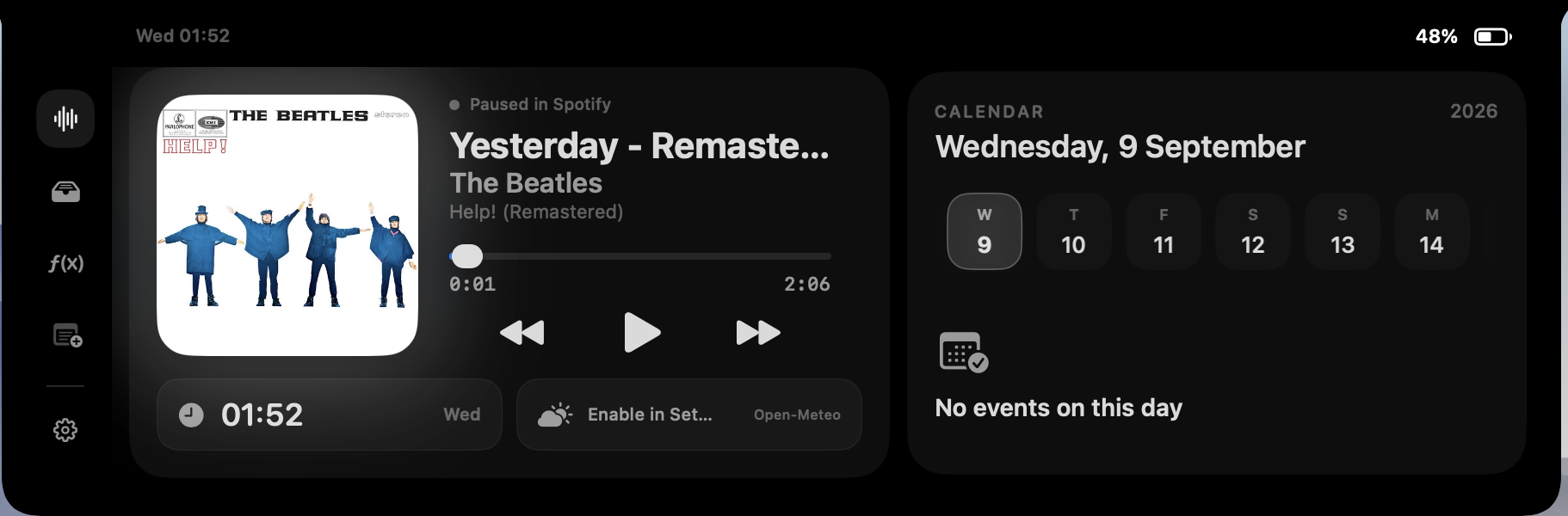
When a supported media session is active, Fide Island can show the track title, artist, album artwork, playback state and progress beside the MacBook notch. The information stays in a small, predictable place instead of requiring a trip to Music, Spotify, a browser tab or Control Center.
The surface is designed for quick checks. Open it when you want more context, use the controls, then let it settle back around the camera cutout. It is not a replacement for your music app; it is a faster way to reach the actions you use repeatedly.
02 / PLAYBACK
The essential controls stay within reach.
Use play or pause, move to the previous or next track, and read playback progress from the expanded island. Fide Island uses the current macOS Now Playing session where it is available, so the experience can follow supported media across the system rather than being tied to a single music service.
A narrower Automation fallback exists for selected media apps and browsers when the system path is unavailable. Compatibility can vary after macOS or media-app updates, so the source application still remains the final place for queue management and service-specific controls.
Now Playing data is processed locally for display. It is not uploaded to a Fide Island media account or analytics profile.
03 / NEXT UP
Put the next event beside the current track.
The optional calendar panel adds a compact view of upcoming events to the same surface. It is useful when you want to keep an eye on the next meeting or task while music continues in the background.
Calendar access is not required for media controls. macOS asks for Calendar permission only when that feature needs it, and you can remove the permission later in System Settings. If you leave Calendar disabled, the media experience continues without it.
04 / DATA & ACCESS
Your media activity stays on the Mac.
Fide Island reads the Now Playing information needed to render the interface. Its system-wide path uses a bundled compatibility component that runs locally. The app does not send track titles, artists, artwork or playback history to the Fide Island access service.
For a precise permission map, including the optional Automation fallback and Calendar access, review the Data & Permissions page. The Privacy Policy explains local processing and network boundaries in more detail.
05 / IS IT A FIT?
For people who live in media but work in other apps.
This feature is most useful if you regularly switch between music, podcasts or browser media while writing, designing, coding or studying. The value is not another large player window. It is having the small controls you need in a consistent place that already exists on your screen.