
01 / TEMPORARY SHELF
Hold a file between one task and the next.
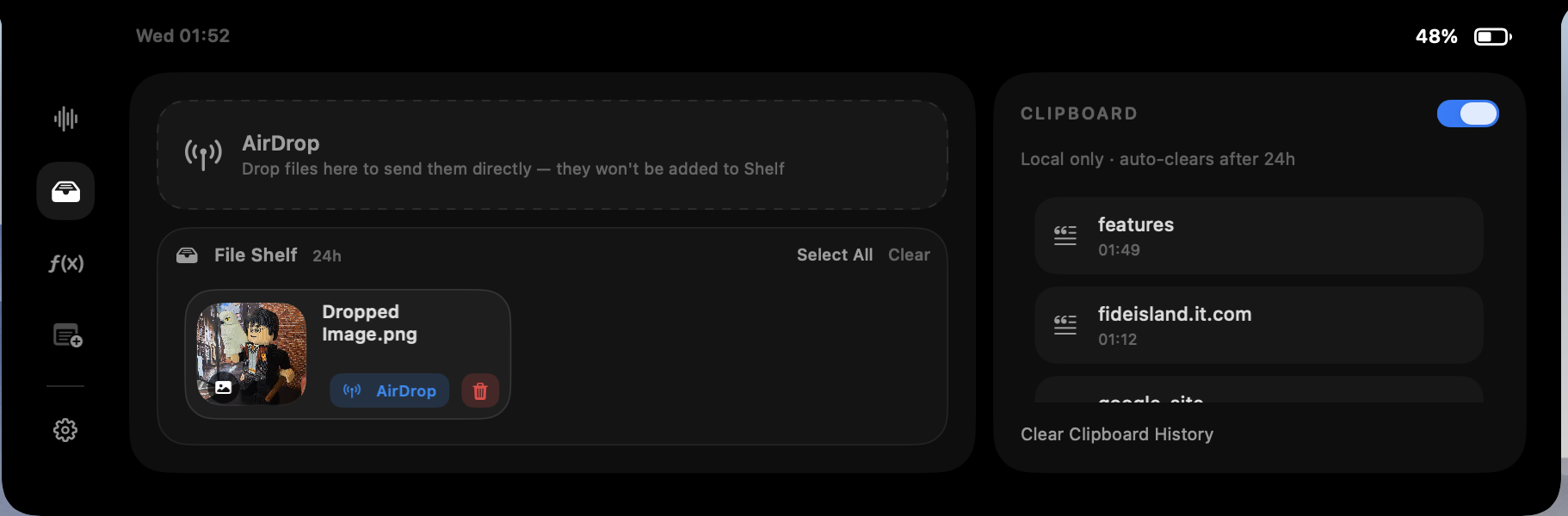
The file shelf gives selected files a temporary landing place beside the notch. Drag in the item you are actively moving, switch to the destination, then take it from the shelf when you are ready. It is useful when a desktop folder would be too permanent and keeping Finder windows open would add clutter.
Fide Island reads only files you intentionally select or drop into this flow. The app uses a user-selected, read-only file entitlement rather than Full Disk Access. Removing an item from the shelf removes the copy managed by Fide Island, not the original source file.
02 / RECENT CLIPS
Bring back what you copied a moment ago.
Clipboard history can keep recent text, images and file URLs close at hand while it is enabled. That helps when you need the item before the most recent copy, or when several pieces of text need to move between documents.
The feature is intentionally smaller than a permanent knowledge base. It is designed around short-lived work, has a cap in the current app implementation, and can be disabled from Fide Island settings. You can also clear the history manually.
03 / SEND
Use a dedicated drop target for AirDrop handoffs.
The expanded island includes a clear drop area for files you want to send rather than store. This separates the AirDrop action from the temporary shelf, so dropping into the send target does not quietly add the item to your shelf.
Because the action starts with a file you choose, the interface makes the handoff visible and deliberate. The original file remains where it was; the island is the control surface for the task.
04 / RETENTION
Local and short-lived by design.
Shelf copies and clipboard history are stored locally and designed to expire after 24 hours. Fide Island does not upload shelf files or clipboard content to its access service, billing system or website analytics.
This does not make the feature a secure vault: copied content is still present on your Mac for the retention window while history is enabled. Avoid placing secrets in any clipboard manager, clear sensitive items when you finish, and disable the feature if your workflow does not need it.
05 / SIMPLE WORKFLOW
Use it for the in-between moments.
- Drag a selected file into the shelf when you need it again shortly.
- Switch to the destination app without keeping Finder in front.
- Take the file from the island, or use the separate AirDrop target when sending it.
- Retrieve a recent clipboard item when the latest copy is not the one you need.
- Clear items manually or let the short retention window do its job.
The result is less desktop housekeeping for work that was never meant to become permanent.