
01 / RECENT NOTES
Reach the note without opening another full window.
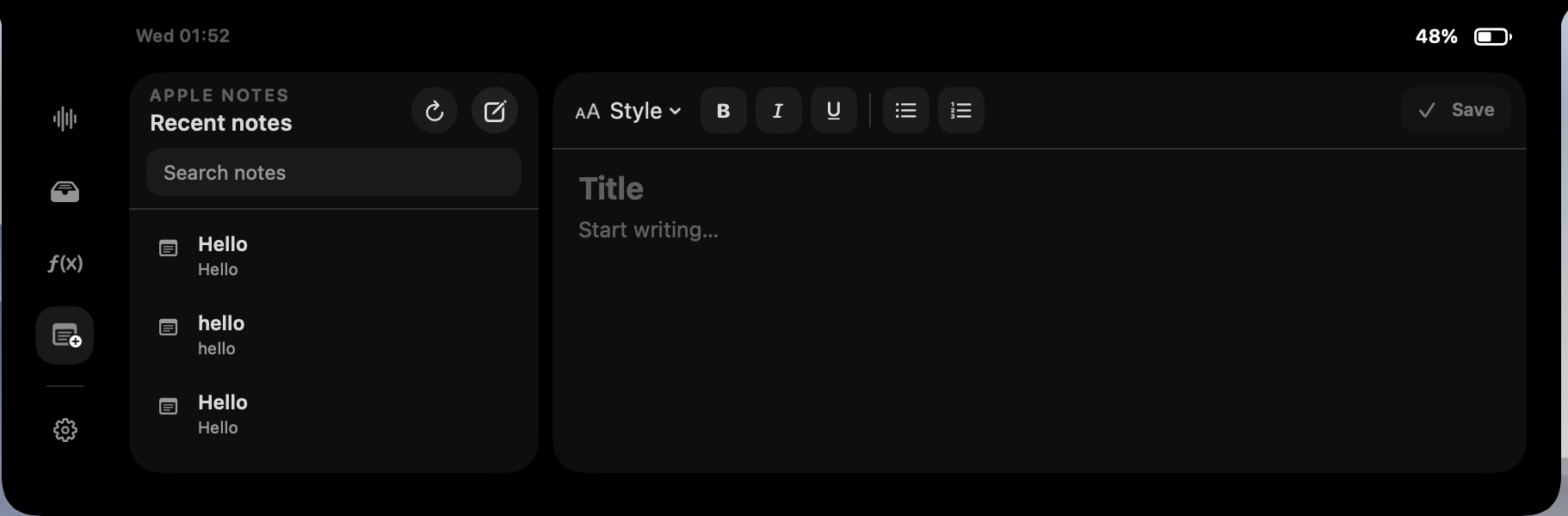
Fide Island can show recent Apple Notes in a compact list around the MacBook notch. Search helps narrow the list when the note you need is not at the top. Select a result to read or continue working with it in the adjacent editor.
This is meant for quick access: capture a thought, check a short list or update a note while the main app you are using stays in place. You can still open the note in Apple Notes whenever you need its full set of tools.
02 / CREATE + EDIT
Capture and update notes from the same small surface.
Create a new note, edit supported note content, save changes and open the result in Apple Notes. The interaction stays close to the top of the display, which reduces window switching for small updates while leaving Apple Notes available for folders, attachments and longer writing.
Fide Island is not a second notes database. It communicates with Apple Notes for the actions you request. That distinction keeps the feature focused and avoids creating another copy that you would need to organize or reconcile.
03 / PERMISSION
macOS asks before Fide Island can use Apple Notes.
The feature uses the macOS Automation permission. The system controls that prompt and the permission can be revoked later under Privacy & Security in System Settings. If access is not granted, the rest of Fide Island can continue without the Notes feature.
Automation access lets the app read the note information required for the list and editor, and create, edit, save or open notes when you ask it to. Fide Island does not request Accessibility, Full Disk Access, camera, microphone or Screen Recording permission for this feature.
04 / WHERE NOTES LIVE
Apple Notes remains the source of truth.
Fide Island does not maintain a separate cloud copy of note content. The Notes integration reads and writes through Apple Notes on your Mac. If your notes sync through iCloud or another account, that synchronization is controlled by Apple Notes and your Apple account settings rather than by a Fide Island notes service.
Note titles, previews and content needed for the current interaction are processed locally. They are not attached to the Fide Island trial service, website analytics or the optional Gemini assistant.
Using the Notes panel does not automatically send a note to AI. Optional Gemini requests happen only when you separately configure the assistant and submit a prompt.
05 / IS IT A FIT?
For the note you need while doing something else.
The Notes panel is most useful for small, frequent interactions: checking a list during a call, saving a sentence while reading, updating a project note or finding a recent reference without rearranging the desktop.
For long-form writing and deeper organization, Apple Notes itself remains the better workspace. Fide Island shortens the path to the common actions around it.